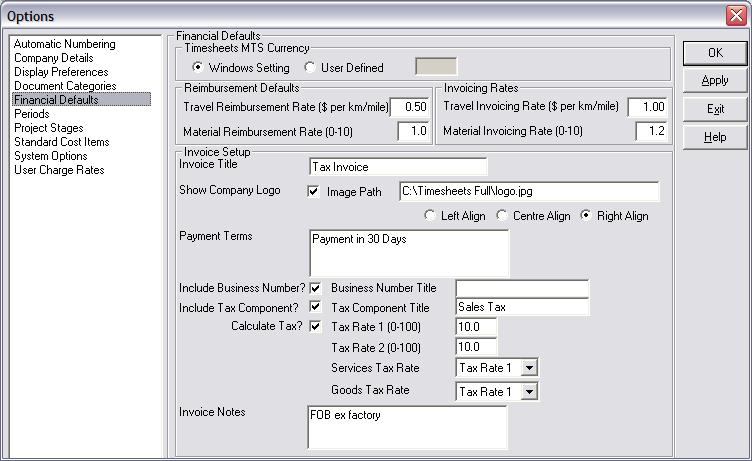
| Setting |
Description |
| Timesheets MTS Currency |
Timesheets MTS can use either the currency set by your MS Windows settings or alternatively you can define your own currency for Timesheets MTS to use. |
| Travel Reimbursement Rate |
The rate (in $ per distance travelled) that employees get reimbursed at if they use their own vehicle. |
| Material Reimbursement Rate |
The reimbursement factor applied for employees who pay expenses from their own pocket. For example, a rate of 1.1 means the employee will be reimbursed at the actual amount expended plus 10%. |
| Travel Invoicing Rate |
The rate (in $ per distance travelled) that travel is invoiced at. |
| Material Invoicing Rate |
The markup applied for project expenses at invoicing. For example, a rate of 1.5 means the customer will be charged at the actual amount expended plus 50%. |
| Invoice Title |
The title shown on the Timesheets MTS invoices. |
| Show Company Logo |
Enable this option to show your company logo on Timesheets MTS invoices. |
| Image Path |
Enter the path to you logo file if you want to display your logo on Timesheets MTS invoices. |
| Left Align/Centre Alogin/Right Align |
Select the position of your company logo on the Timesheets MTS invoices using these options. |
| Payment Terms |
Enter the payment terms to be displayed by default on your invoices (for example NET 30 days). These terms can be changed on an invoice by invoice basis. |
| Include Business Number |
Use this option to display your business number (set on the Company Details option screen) on your Timesheets MTS invoices. |
| Business Number Title |
If you want to display your company number on Timesheets MTS invoices then you can enter a title here (eg RBN, ACN, ABN etc etc). |
| Include Tax Component |
Enable this option to include a tax field on your Timesheets MTS Invoices. This can be used to deal with state taxes, VAT, GST, or sales tax. |
| Tax Component Title |
If you choose to include a tax component on your Timesheets MTS invoices you can title the component here. |
| Calculate Tax |
Enable this option to have the displayed tax component calculated automatically. |
| Tax Rate 1 |
Set tax rate 1 to a percentage between 0 and 100. |
| Tax Rate 2 |
Set tax rate 2 to a percentage between 0 and 100. |
| Services Tax Rate |
If your tax system has a different tax rate applied to goods and services you can choose to assign the service tax rate here. It can be assigned to Tax Rate 1 or Tax Rate 2. |
| Goods Tax Rate |
If your tax system has a different tax rate applied to goods and services you can choose to assign the goods tax rate here. It can be assigned to Tax Rate 1 or Tax Rate 2. |
| Invoice Notes |
Enter any generic invoice notes that you want to appear on Timesheets MTS invoices here. |